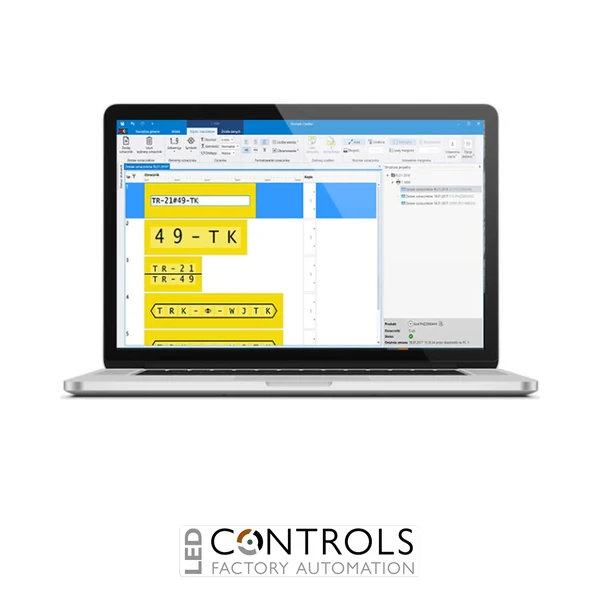
Why Choose the Partex PROMARK-CREATOR 1 Year Software Licence?
The Partex PROMARK-CREATOR 1 Year Licence is an annual software subscription for the Promark Creator Design and Print application, a professional solution for designing, managing and printing electrical identification markers. Developed by Partex, Promark Creator helps electrical engineers, panel builders and industrial maintenance teams produce consistent identification for wires, cables, terminal blocks and electrical components.
Designed to simplify electrical marking workflows, Promark Creator combines an intuitive marker design interface with advanced data import, print preview and production management capabilities. Users can create customised cable numbers, terminal references, equipment identifiers and other technical descriptions, then print them using compatible Partex marking systems.
The PROMARK-CREATOR product provides a 12-month renewable licence for the software's printing functionality. It is particularly suitable for customers renewing their existing Promark Creator subscription and continuing to use supported Partex printing equipment.
Supplied as 1 software licence, this product provides access to a professional marking workflow without requiring the purchase of a new printer. Promark Creator software is downloaded separately, and the licence is activated using the applicable Partex licensing process.
Key Advantages
- 12-month software licence for Partex Promark Creator Design and Print.
- Supports professional design and printing of electrical identification markers.
- Suitable for renewing an existing Promark Creator printing subscription.
- Helps create clear and consistent wire, cable, terminal and equipment identification.
- Advanced marking data import reduces repetitive manual entry.
- Supports importing project information from engineering design software.
- Includes integration workflows for data originating from EPLAN and SEE Electrical.
- Provides an intuitive interface for creating customised marker descriptions.
- Visual print preview allows marker layouts to be checked before production.
- Supports printing with compatible Partex marking systems.
- Allows multiple marking projects to be printed on supported devices simultaneously.
- Enables users to prepare new projects while other projects are printing.
- Supports project saving and transfer between departments or installation locations.
- Can help reduce manual data entry errors and unnecessary test printing.
- Suitable for panel builders, machine manufacturers and electrical contractors.
- Helps standardise electrical identification across large projects.
- Supports more efficient marking production and project organisation.
- Provides access to the licensed printing functions for the subscription period.
Key Features
- Manufacturer: Partex.
- Manufacturer part number: PROMARK-CREATOR.
- Software name: Promark Creator.
- Licence type: Annual renewable software subscription.
- Licence duration: 1 year.
- Pack quantity: 1 licence.
- Licensed edition: Design and Print.
- Primary function: Electrical marker design and print management.
- Data import: Marking Data Import Wizard.
- Design tools: Customised text, numbering, symbols and advanced expressions.
- Print preview: Visual marker layout preview.
- Printing: Supported Partex marking printers.
- Multi-device printing: Supported.
- Project management: Save, transfer and reuse marking projects.
- Engineering data workflows: EPLAN and SEE Electrical data import.
- Operating system: Microsoft Windows.
- Software delivery: Downloadable application with licence activation.
- Application: Industrial electrical identification and marker production.
Professional Electrical Marker Design and Production
The Partex Promark Creator application provides a central platform for designing and managing electrical identification. It is intended for engineers and technicians who need to produce accurate marking information for cables, conductors, terminals and electrical equipment.
Instead of preparing every label or marker individually, users can organise marking information into structured projects. This helps ensure that cable references, terminal numbers and equipment identifiers correspond to the electrical documentation used during installation and commissioning.
The software also supports detailed marker formatting. Users can prepare alphanumeric descriptions, incorporate symbols and numbering, and configure the appearance of markers to suit the selected identification profile.
For electrical panel builders and OEM machinery manufacturers, this provides a practical way to standardise marking information across multiple assemblies and projects.
Advanced Data Import from Electrical Design Projects
One of the most useful Promark Creator features is the Marking Data Import Wizard (MDIW). This allows users to prepare marker projects using information imported from engineering documentation rather than manually entering every reference.
The software supports workflows involving data from electrical design applications such as EPLAN and SEE Electrical. Relevant information can be selected and formatted to create the identification required for cables, terminals and electrical components.
An advanced expression editor provides additional flexibility when working with imported data. Users can create customised descriptions, combine information and apply numbering or formatting rules according to project requirements.
This approach is particularly beneficial for large electrical projects containing hundreds or thousands of identification references. By reducing repeated data entry, Promark Creator can help improve consistency between design documentation and the finished installation.
Visual Marker Design and Print Preview
The Visual Design functionality allows users to review marker layouts on screen before printing. This helps confirm that the selected text, formatting and identification profile are appropriate for the intended application.
Previewing the finished marker can reduce the need for physical test prints and help users identify formatting issues before consuming marking material.
This is particularly useful when preparing longer descriptions, multiple lines of text or identification layouts for different marker sizes.
By providing a clearer view of the intended print result, Promark Creator supports more predictable marker production and helps reduce avoidable material waste.
Efficient Printing and Multi-Device Production
The licensed Design and Print edition of Promark Creator supports printing with compatible Partex marking systems. Users can prepare identification projects and send them to supported printing equipment as part of an organised production workflow.
The software supports multi-printing, allowing several projects to be printed on different compatible devices simultaneously. This is useful where a production department needs to prepare markers for different cable sizes, terminal types or electrical components.
Promark Creator also allows users to work on a new marking project while another project is printing. This can help minimise interruptions and improve throughput during larger identification jobs.
Printer compatibility depends on the specific Partex device, installed drivers and software configuration. Confirm compatibility with the intended printer before purchasing or renewing the licence.
Save, Share and Manage Marking Projects
Promark Creator supports the creation and saving of marking projects for later use. This allows users to maintain identification information for repeat production, maintenance activities and future electrical system modifications.
Projects can also be transferred between departments or locations. For example, an engineering team can prepare identification data in the design office and provide it to a workshop or installation team equipped with a suitable printer.
The software also supports workflows where marking projects are prepared digitally and supplied to Partex for production. This can be useful for customers who require professionally printed identification but do not have the necessary printing equipment available.
These capabilities make Promark Creator suitable for businesses seeking a more organised approach to electrical marking and identification management.
Understanding the 1 Year Promark Creator Licence
The PROMARK-CREATOR licence is a one-year renewable subscription associated with the software's Design and Print functionality.
Partex also offers a free Design version of Promark Creator for creating marking projects without the licensed printing features. The paid Design and Print edition extends these capabilities to support printing on compatible marking systems.
The software is available to download from Partex. A trial of the Design and Print functionality is available, after which continued use of the licensed printing functions requires an active subscription.
This product is particularly relevant for customers renewing an existing software licence. If the software was supplied with a newly purchased Partex printer, check whether an initial licence period is already included before ordering an additional subscription.
Licensing note: Activation requirements, licence assignment and renewal arrangements should be confirmed with the supplier. This product is a software licence and does not include a physical printer or marking consumables.
Typical Applications
- Electrical wire and cable marker design.
- Industrial control panel identification.
- Terminal block and terminal strip marking.
- Electrical component and equipment identification.
- PLC cabinet and automation system marking.
- Motor control centre identification.
- Electrical distribution and switchgear projects.
- OEM machinery and equipment manufacturing.
- Industrial maintenance and refurbishment projects.
- Batch production of electrical identification markers.
- Importing cable and terminal references from engineering documentation.
- Electrical design office and workshop collaboration.
- Multi-printer marking production environments.
- Standardisation of identification across multiple installations.
- Preparation of marking projects for outsourced production.